
Builds
Everblue Dungeons Builds: Weapon Pairs, Sets and Stats
Last updated:
Build around the fight you want to handle: bow attacks and freezing for early enemy waves, matching equipment for set bonuses, or more defensive stats when survival slows your progress.
For early Goblin fights, equip Favian Caster and Cyro Spear, then press G to switch between bow attacks and ice control. Dragon Slayer with Berserker offers a listed +14% DPS and +7% Armor set bonus. Match artifacts to their weapon requirements, use Yin with Yan or Thần Long for offensive support, and spend your 3 points per level according to your damage and survival needs.
Choose a Weapon Pair for Your Fight
| Goal | Weapon pair | Why choose it? |
|---|---|---|
| Early Goblin crowd control | Favian Caster + Cyro Spear | Combine a Light-element bow with an Ice weapon that can freeze enemies. |
| Wind attacks with a second skill set | Zanpakuto + Hammer | Keep Wind damage available through Zanpakuto and switch to Hammer's separate attacks. Hammer has no element. |
Favian Caster + Cyro Spear is a useful early starting point. Put Favian Caster in Weapon 1 and Cyro Spear in Weapon 2. Open with the bow, then switch to Cyro Spear when you want freezing control against approaching enemies.
Choose Zanpakuto + Hammer when you want Wind attacks alongside another moveset. Your copy's enchantment matters: Warbrand adds +25% damage and +15% critical chance to a Zanpakuto carrying that enchantment. Compare enchant benefits in the enchant tier list.
To equip and use either pair:
- Open Bag → Weapon, select a weapon you own and choose Equip.
- Check Weapon 1 and Weapon 2 after equipping the second weapon. For the Zanpakuto pairing, put Zanpakuto in Weapon 1 and keep Hammer in Weapon 2.
- Press G during combat to switch weapons and skill sets. Check the new skill bar before attacking; switching can briefly show a cooldown.
Rotate through skills you have unlocked on each weapon. A second weapon gives you another set of attacks, but its locked skills remain unavailable. Use the weapon directory for individual movesets and the element guide when choosing a pair for a particular enemy.
Build Around Weapon-and-Armor Sets
| Required combination | Listed DPS bonus | Listed Armor bonus | Armor benefits |
|---|---|---|---|
| Dragon Slayer + Berserker | +14% | +7% | Level 1 Berserker: +48 Max HP and 14% Flame Resist |
| One Sword Style + Frostveil Princess + the brown, gold-trimmed third item in the set panel | +6% | +18% | Frostveil Princess outfit preview: +60 Max HP and 12% Ice Resist |
Favor Dragon Slayer + Berserker for the larger listed damage bonus. Berserker also adds protection against flame attacks. Both pieces are rewards from The Black Swordsman's Legacy; follow the Guts quest requirements and rewards to obtain them.
Favor the complete One Sword Style combination when you want the larger listed Armor bonus. Identify Frostveil Princess by the blonde character in blue-and-white clothing, and match the brown, gold-trimmed third item in One Sword Style's set panel. All three pieces belong to this combination; the weapon and outfit alone do not complete it.
Electro Blade's set panel lists +9% DPS and +14% Armor beside a purple-haired character portrait. Those bonuses belong to the matching combination, not to Electro Blade equipped by itself.
To assign Berserker, open Bag → Equips, select it and choose Assign, then select the intended weapon. Use the armor and assignment guide for equipment handling and acquisition details.
Add Compatible Artifacts
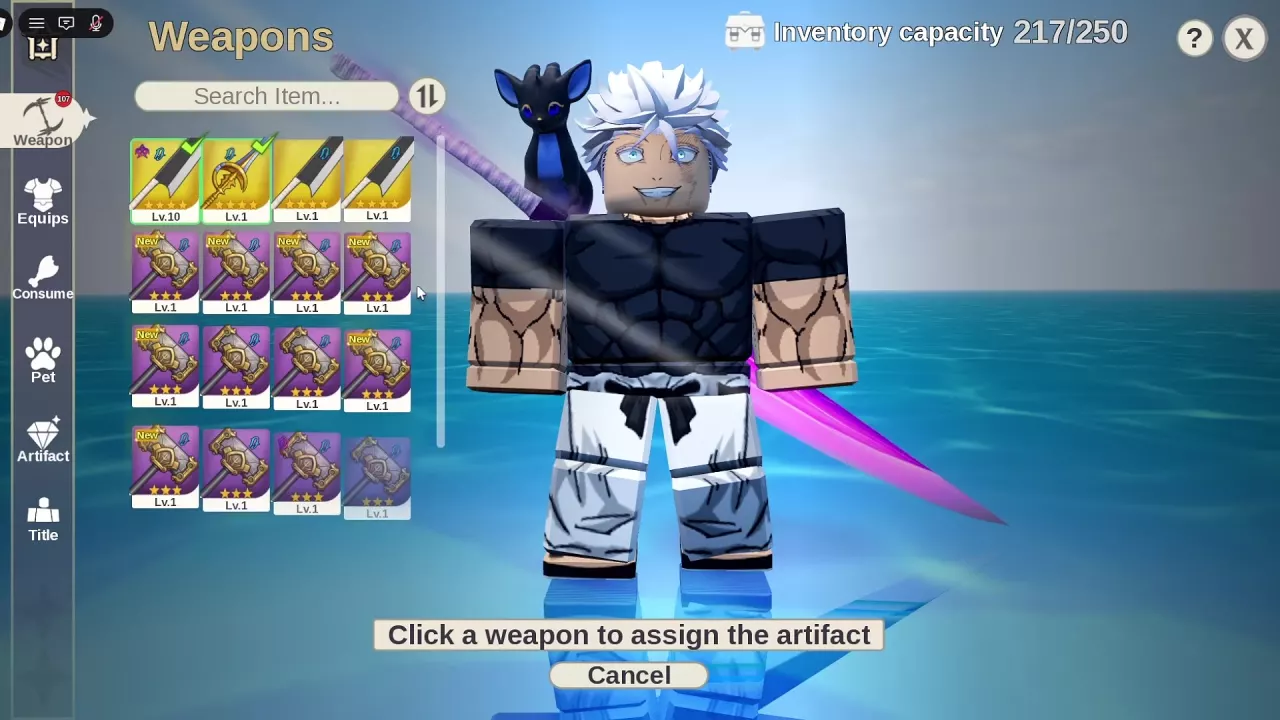
Lightning Spear with Swift Feather
A Level 1 Swift Feather supplies Damage +2% when assigned to Lightning Spear.
- Open Bag → Artifact and select Swift Feather.
- Choose Assign.
- Select Lightning Spear in the weapon selection screen.
- Look for Artifact equipped and the feather icon on the weapon.
To complete the Damage Relic Set, assign Swift Feather, Flame Heart, Life Gem and Star Shard to the same weapon, with every piece meeting the set's eligibility requirements. The complete set's panel lists “Family: +3.75% per artifact.” Splitting the pieces between your two weapons does not satisfy the same-weapon requirement.
Ice weapons with the Secret Ice combination
For an Ice build such as Cyro Spear, use these four different artifacts together on that weapon:
- Absolute Heart: damage support; its Level 1 effect is +7% damage on an Ice weapon.
- Frost Eye: critical-chance support.
- Frozen Hourglass: cooldown support.
- Hoarfrost Fortune: drop-rate support.
Equipping all four together on an Ice weapon increases each artifact's effect by 6.5 percentage points. The element must be exactly Ice: Favian Caster's Light element and Lightning Spear's Lightning element do not qualify. Keep this combination on the Ice member of your weapon pair.
See the artifact directory and set bonuses for individual artifact details.
Fill Pet and Companion Roles
Choose pets for damage or drops
You can equip two pets through Bag → Pet, but they must be different species. Only one pet of each species can be equipped.
| Goal | Pet choice | Benefits and cost |
|---|---|---|
| Damage plus a stronger critical-chance contribution | Yin + Yan | Level 1 Yin supplies +22% damage; Yan's shop bonus is +22% critical chance. Each costs 2,000 Gems, or 4,000 Gems for both. |
| More emphasis on damage, with some critical chance | Yin + Thần Long | Level 1 Yin supplies +22% damage. Thần Long's purchase-stage bonuses are +13% damage and +8% critical chance. Buying both costs 3,500 Gems. |
| Drop support | Rain + a different species | Level 1 Rain supplies Drop +5%, leaving the other slot available for another benefit. |
Choose Yin + Yan when you want a larger critical-chance contribution. Yin + Thần Long costs 500 fewer Gems and shifts the second pet toward damage. Yin is also called Âm in the Vietnamese interface. The pet interface lists a 50% combined cap for damage and critical bonuses, so account for that cap when adding offensive pet benefits.
Use the pet recommendations to compare purchases by budget, or the pet guide for buying, equipping and feeding.
Choose a companion for its first skill
A companion enters combat briefly, uses its saved weapon's first skill, then disappears. Dealing more damage charges another appearance. Pick its weapon for that first skill and its element, so the companion adds a useful attack to your own rotation.
A preset requires a weapon and a full outfit. Companion slots unlock at character Levels 15, 35 and 50. Follow the companion preset guide to unlock and save the loadout.
Allocate Stats for Damage and Survival
Each character level-up gives 3 stat points. Spend them on Max Health, Damage Increase or Damage Reduction.
- Favor Damage Increase when you survive comfortably but take too long to defeat enemies.
- Favor Max Health when you need a larger health pool to survive incoming hits.
- Put points into Damage Reduction when incoming damage is the main obstacle to finishing fights.
To allocate points:
- Open Profile → Stats.
- Set the allocation quantity above the stat list. Use 1 for precise individual allocations.
- Click + beside the stat you want to increase.
- Return to Profile to inspect your character and loadout.
Level 8 mixed allocation example
Start with 12 unspent points and existing investments of 2 Max Health, 5 Damage Increase and 2 Damage Reduction. Spend the available points as follows:
| Stat | Already invested | Add now | Final points | Stats panel bonus before → after |
|---|---|---|---|---|
| Max Health | 2 | 3 | 5 | +2% → +5% |
| Damage Increase | 5 | 5 | 10 | +2.5% → +5% |
| Damage Reduction | 2 | 4 | 6 | +1.6% → +4.8% |
Adding the health points first leaves 9 unspent points; adding the damage points leaves 4; adding the reduction points spends the remainder. The result is 21 total invested points, with a stronger emphasis on damage while still investing in both defensive stats.
Use this as a mixed allocation example, then adjust your priorities to the problem you are having in combat. The percentages above are Stats-screen values: immediately afterward, Profile still displayed 1.6% Damage Reduction while Stats displayed 4.8%, so that screen mismatch should not be treated as a measured reduction in damage taken.
Read Combat Power Alongside Your Actual Loadout
Open Profile from the top menu to inspect Combat Power alongside your health, level, weapon, Weapon ATK, enchant, Armor Set, critical chance, drop chance, pet buffs and current weapon skills. You can also double-click another player to view their profile.
Use Combat Power as one part of your decision. An elemental match, a freezing attack or a complete equipment set can explain why a loadout fits a fight better than its power number alone suggests. Compare your weapon skills, set requirements and pet roles before replacing a useful combination simply to raise the displayed number.
Rec PwrLvl is a recommendation, not a hard entry requirement. Witch Ruin Chapter I can be entered below its recommended power of 25,000, provided you meet the actual level and unlock requirements.
Increasing maximum health does not automatically refill current health. In the Level 8 allocation example, health read 1,020/1,050 afterward. Check both numbers before returning to combat; a larger maximum does not mean you are at full health.