
Combat
Everblue Dungeons Controls, Skills and Dodging
Last updated:
Learn the combat keys, equip two weapons, and unlock each weapon’s skills. Practice your attacks in town, then use enemy warnings to time your movement and dodges.
Use M1 to attack, LeftShift to dash, G to swap equipped weapons, and Ctrl to toggle Shiftlock. For the Z/X/C/V/T skill layout, X unlocks at weapon level 6, C at 15, V at 28, and the T ultimate at 40; Z is available early. These requirements use weapon level, not character level. Practice on the Training Area dummies to read DPS, Total Damage, and Damage Time(s).
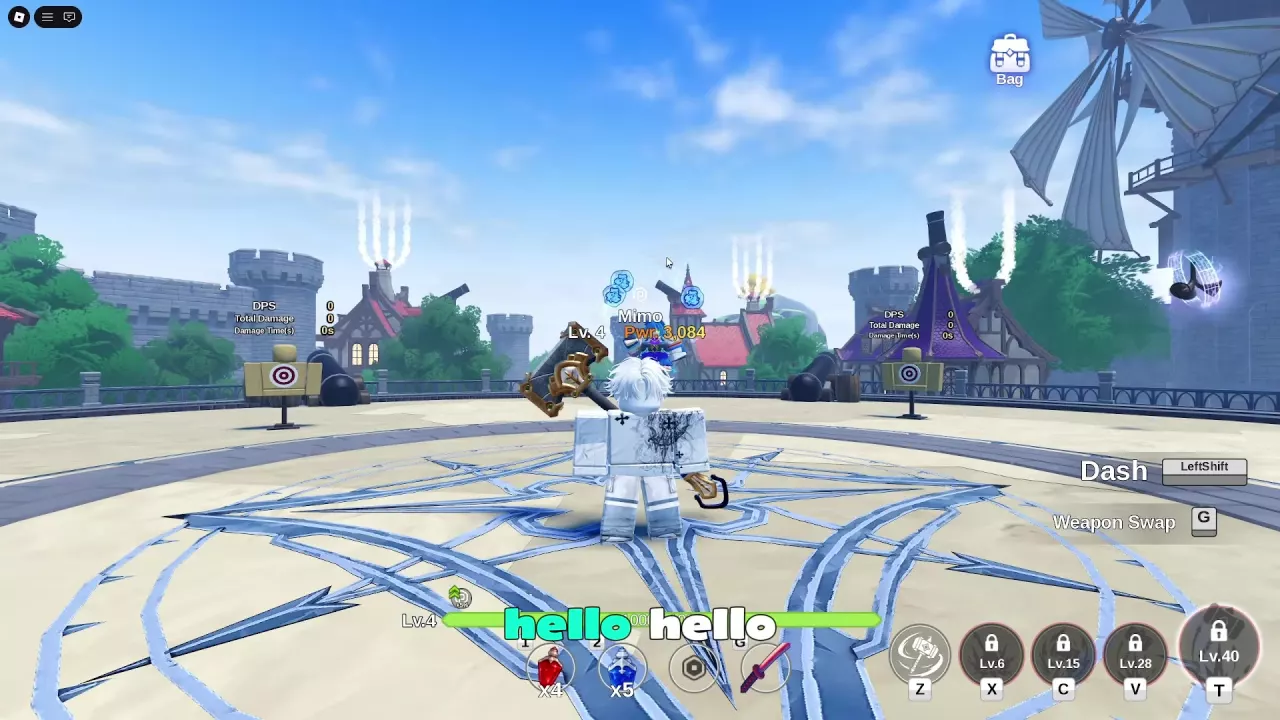
Combat Controls and Aiming
| Input | Action |
|---|---|
| M1 / left mouse button | Normal attack |
| LeftShift | Dash |
| G | Switch between your two equipped weapons |
| Ctrl | Toggle Shiftlock |
| Z, X, C, V | Regular skills on weapons using this layout |
| T | Ultimate, once unlocked |
| R | Fourth regular skill on some weapons, including a fire-weapon layout |
| Q | Activate the separate lower-left action when your setup provides it |
Combine normal attacks with your unlocked skills. When a skill displays an attack-position indicator, aim it so the marked attack area covers the enemy. Direction, reach, and effects depend on the weapon; use the weapon directory to look up individual movesets.
For a setup with the separate Q action, press Q when its lower-left icon is available. A setup using this action briefly makes the character translucent with blue-white afterimages before normal visibility returns, and the icon darkens after activation.
Equip Two Weapons and Swap Skill Sets
You can carry weapons in Weapon 1 and Weapon 2, then switch between them in town or during combat.
- Open Bag → Weapon and select a weapon.
- Click Equip. Look for the Weapon equipped message, a green checkmark, the Unequip button, and an updated weapon-slot icon.
- Equip your second weapon and check that both Weapon 1 and Weapon 2 contain the weapons you want. Replacing Weapon 1 can leave Weapon 2 equipped, so check both slots after making changes.
- Close the bag and press G to switch your active weapon.
- Read the new skill bar before attacking: the moves, available skills, and some key bindings can change.
Each weapon has its own skill progression, so a skill available on one weapon can still be locked on the other. A short cooldown can also appear on the quick bar immediately after a swap.
Choose a pair for the attacks and utility you want to alternate between. See weapon-pair builds for combinations and element matchups when preparing for a particular enemy.
Weapon Levels That Unlock Skills
Skills unlock through the equipped weapon’s level. Raising your character level does not replace this requirement, and progress on an older weapon does not unlock a new weapon’s moves.
| Skill key | Required weapon level |
|---|---|
| Z | Available early on the starting skill bar |
| X | 6 |
| C | 15 |
| V | 28 |
| T — ultimate | 40 |
This table applies to the Z/X/C/V/T layout. Follow the keys displayed on your current weapon’s bar when it uses another layout, such as R for the fourth regular skill.
Fight enemies with the weapon you want to develop and watch for Weapon Level Up notifications. Once it reaches the required level, use the newly available skill key; at weapon level 40, press T for the ultimate. Used skills can darken and display a circular recovery indicator while cooling down.
For the methods and costs involved in raising a weapon’s level, follow the weapon upgrade guide.
Dash Out of Warnings and Avoid Counterattacks
Enemies can retaliate during your combos. Repeated hits do not reliably keep them locked down, so leave yourself room to retreat instead of staying in melee range until an attack lands.
- Watch enemy attack warnings while using normal attacks and skills.
- As an attack approaches, move out of its marked area and use LeftShift to dash clear.
- Check your landing position, then resume attacking when you have space.
A well-timed dash can trigger Perfect Dash alongside an IMMUNE indicator. Treat that as a timing reward; do not assume every dash makes you invulnerable. LeftShift performs a dash, rather than sustained sprinting.
Keep watching the ground after retreating. During Ice Cube’s ice attacks, danger circles can appear at the arena edge or beneath your character while minions continue chasing you. Reaching the edge does not end the need to move. For the full attack patterns, use the Fire Cube Act I guide or Ice Cube guide.
Life Hearts in Fire Cube and Ice Cube Fights
In Fire Cube Act I and Ice Cube fights with three lit life hearts, one death consumes a heart and returns you to the same fight at full health with two lit hearts. The boss retains the damage you already dealt rather than returning to full HP.
In the Ice Cube fight, wait for the automatic revival countdown, then resume fighting and check your remaining hearts. Use the return to reposition before attacking again.
Practice at the Training Dummies
- Equip the weapon you want to test.
- Follow the Training Area sign above the hub’s central stairs to the circular platform with practice dummies. The AFK portal is nearby.
- Attack a dummy with M1 or an unlocked skill.
- Read DPS, Total Damage, and Damage Time(s) above the target.
DPS is damage per second, Total Damage adds together damage in the sequence, and Damage Time(s) tracks its duration in seconds. A total accumulated across several hits is not the damage of a single skill. For example, an ice-sword sequence with a 112-damage hit followed by a separate 39-damage sword hit totals 151 damage; that does not make 151 the ultimate’s damage.
Use the dummies to learn a skill’s direction and reach, then practice switching weapons and finding the new skill keys. When comparing attack sequences, keep the weapon and equipment setup consistent so the comparison is useful.