
Voidborn
Sinh ra từ Hư Không
- Listed roll chance
- 1.5 %
- Damage bonus
- 30 %
- Critical chance bonus
- 30 %
- Damage reduction bonus
- —
- Skill cooldown reduction
- 5 %
- M1 cooldown reduction
- 5 %
- Enemy item drop rate bonus
- —
Enchants
Last updated:
Weapon enchants add bonuses such as damage, critical chance, cooldown reduction and enemy item drop rate. Voss handles enchant rolls, with confirmation settings that help you keep a useful result.
9 objects
Weapon enchant effects and individual roll chances.
Sinh ra từ Hư Không
Cơn thịnh nộ
Độ chính xác
Tường chắn
Lợi thế của vận may
Mắt chết
Thợ săn kho báu
Equip your weapon, visit Voss and press E to open Enchant. Select the weapon with the top plus card, then use Roll for 1 Enchant Crystal or Roll 5 for 5 crystals in the English interface. Set enchants you want to protect to Ask; choose NO at a replacement prompt to keep the current enchant. Auto stops on Ask selections and when you change the target weapon.
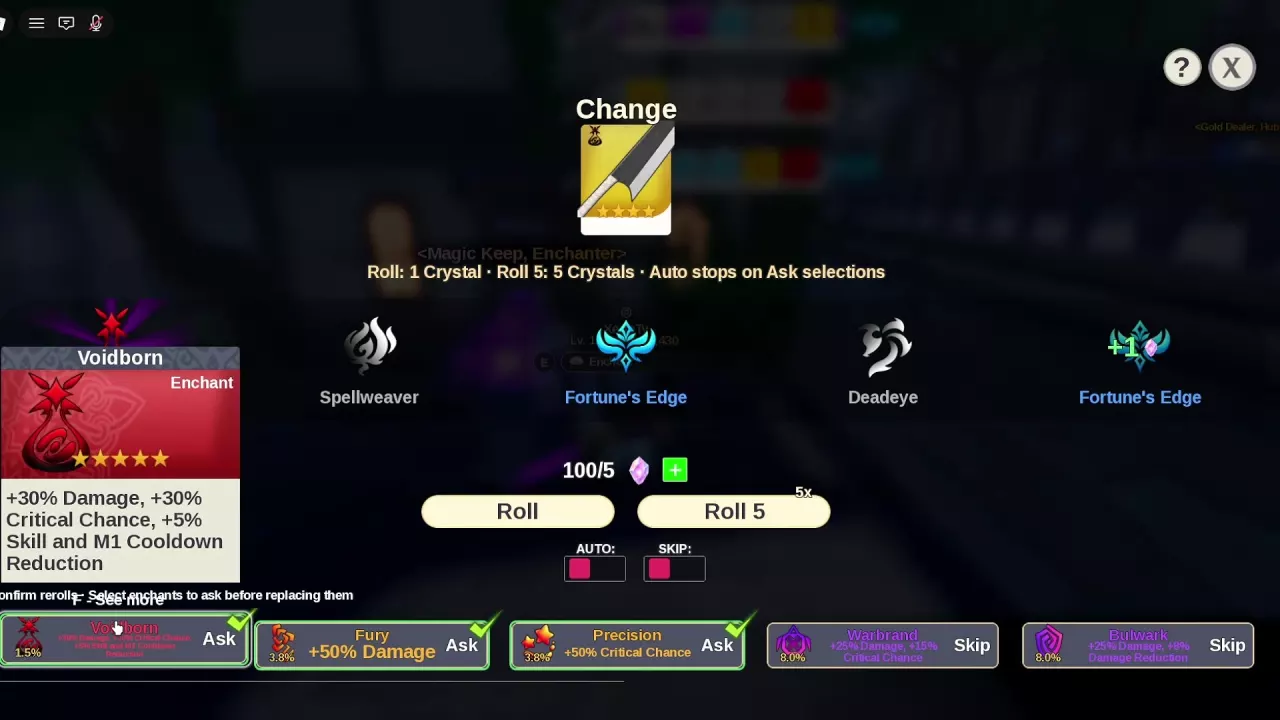
Use the enchant directory to compare bonuses and individual roll chances. Expand More details for additional effects, including cooldown reduction, damage reduction and enemy item drop rate.
Choose bonuses that fit your purpose: damage for offense, damage reduction for survival, or enemy item drop rate for farming. For combat priorities and reasons to keep one enchant over another, see the enchant tier list.
If the menu says “Select a weapon first,” choose a target through the top card before pressing Roll again.
Enchanting changes a weapon's enchant. To change an item's base-stat grade instead, use reforging.
The English enchant menu lists these costs:
| Option | Enchant Crystal cost | Results |
|---|---|---|
| Roll | 1 | 1 |
| Roll 5 | 5 | 5 |
Choose Roll to spend one crystal at a time, or Roll 5 for a batch of five results. Enchant Crystals are a separate resource from Gems.
After the results appear, inspect the enchant badge on the selected weapon card. For example, a Zanpakuto batch containing Voidborn, Spellweaver, Fortune's Edge, Deadeye and a second Fortune's Edge changed the target card's badge from Bulwark to Voidborn. Treat the result row as the batch results; do not add all five bonuses together or budget a crystal refund from a +1 marker.
Configure the entries in the bottom enchant list before rerolling:
| Setting or choice | What it does |
|---|---|
| Ask | Requires confirmation before replacing that enchant. |
| Skip | Skips that enchant's replacement confirmation. |
| YES in a replacement prompt | Proceeds with replacing the current enchant. |
| NO in a replacement prompt | Retains the current enchant. |
A new roll can leave you with a weaker enchant. At a prompt such as “Replace Fury?”, choose NO if Fury already serves your damage goal.
Set Ask for every result you would want a chance to keep. Fury suits a damage focus; Voidborn combines offensive bonuses with cooldown reduction; Bulwark supports damage and survival. If Warbrand or Bulwark is a useful stopping point for your current weapon, protect it too rather than leaving it on Skip. Use the combat enchant rankings to decide your priorities.
Configure your Ask selections before using AUTO. Auto stops when it reaches an enchant marked Ask. Changing the selected weapon also stops Auto, so check the new target and its protection settings before continuing.
The Skip setting beside an individual enchant controls replacement confirmation. The separate SKIP control near AUTO is a different control. AUTO ROLL ENCHANT and SKIP ENCHANT ANIMATION are separate Game Passes; see Game Pass prices and feature entries when choosing between those conveniences.
For other upgrade resources and their uses, see the materials directory.