Rewards
Everblue Dungeons Rewards: Daily, Level and Release
Last updated:
Claim login rewards from the reward window and character-level rewards from Aldric. Quests, Item Index and Pass each have their own reward claims.
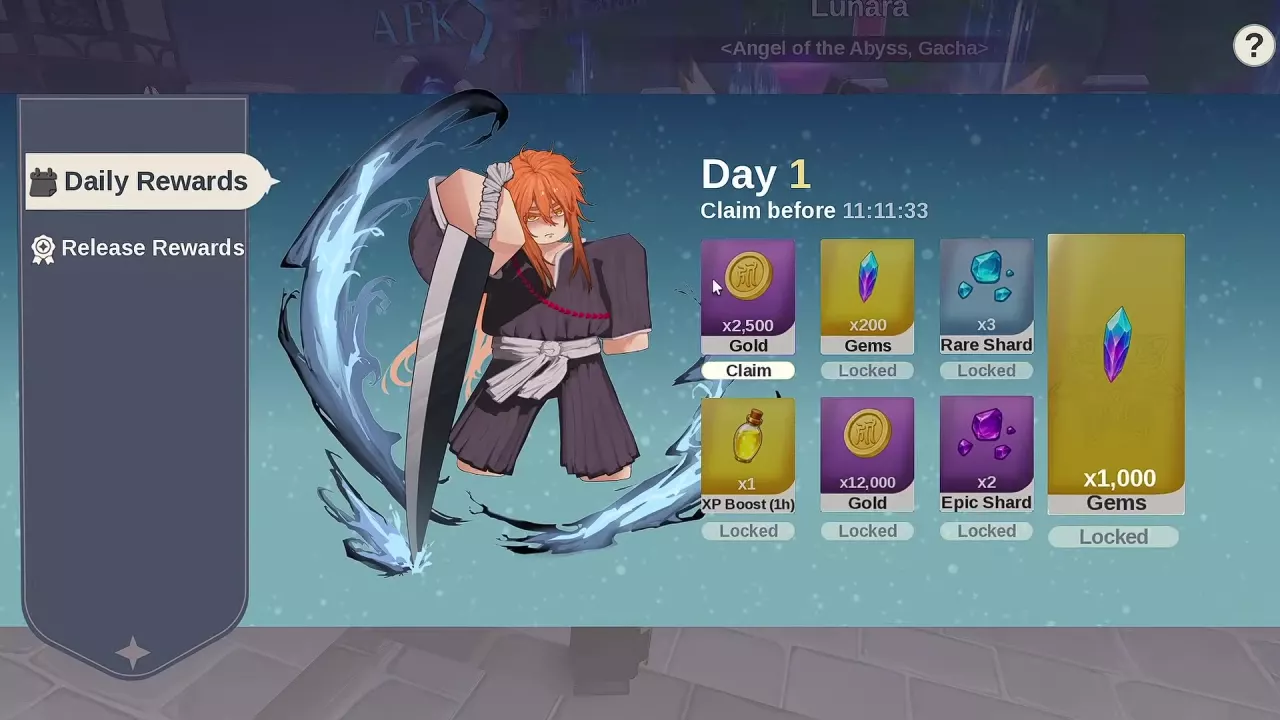
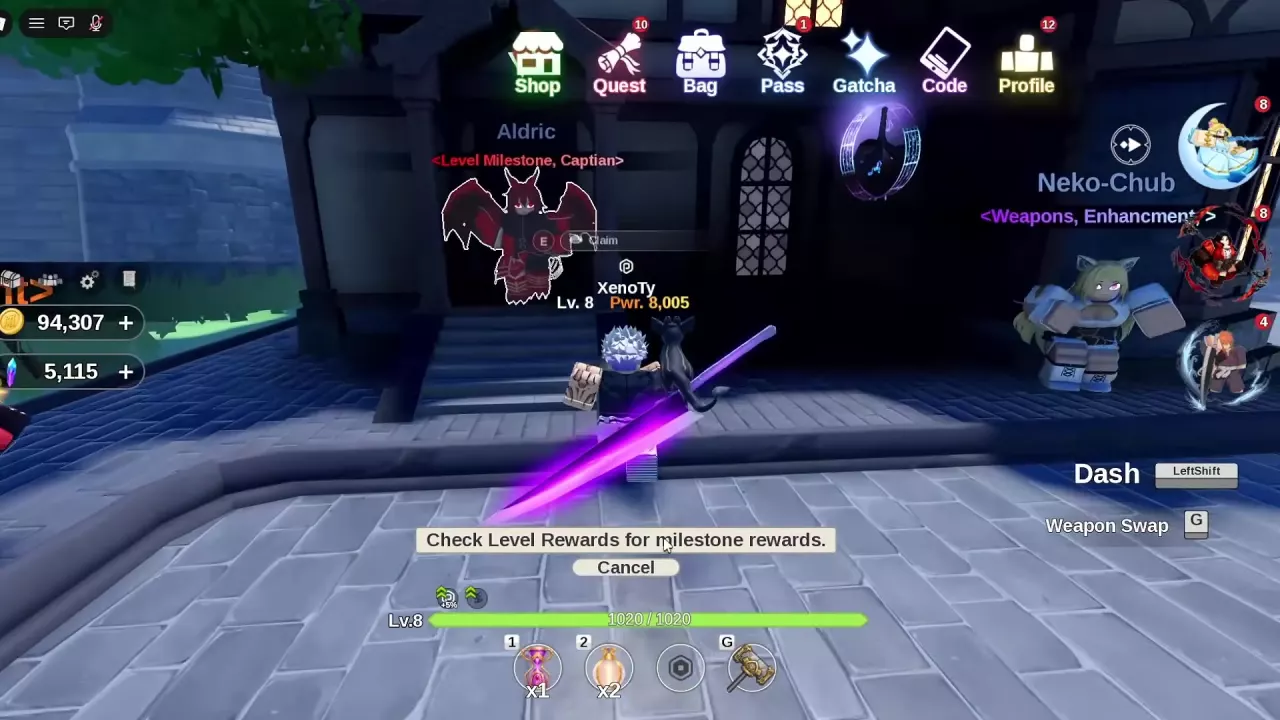
Open the reward icon above the lobby currency display for Daily Rewards and, while available, Release Rewards. Daily Day 1 gives 2,500 Gold; Release Day 1 offers 5 Enchant Crystals. Visit Aldric on the steps near Neko-Chub for level rewards. Claim available cards before their countdown expires; Locked cards must unlock first, while Claimed confirms collection and Next in shows the wait for the next Daily reward.
Find Your Reward Menus
| Reward system | Where to go | What makes a reward claimable |
|---|---|---|
| Daily Rewards | Reward icon above the lobby currency display → Daily Rewards | The card shows Claim. |
| Release Rewards | The same reward window → Release Rewards | The event is available and the card shows Claim. |
| Level milestones | Aldric on the building steps near Neko-Chub | Your character has reached a milestone with an unclaimed reward. |
| Quest rewards | Quest in the top menu | Complete the selected quest's objectives. |
| Item Index rewards | Crystal Artisan / Item Index beside the stairs | Discover items with unclaimed collection rewards. |
| Pass rewards | Pass in the top menu | Reach the required Pass level; Premium rewards also require purchase. |
Claim All applies to the menu you are using. Claiming quests can advance Pass progress, but you still need to open Pass to collect its unlocked rewards. Item Index collection rewards also require a separate claim.
Daily Rewards and the Next In Timer
- Open the reward icon above your lobby currency display and select Daily Rewards.
- Hover over a card to read its item description. Click Claim on an available card before the Claim before countdown expires.
- Collect 2,500 Gold on Day 1. After claiming, the card changes to Claimed and the timer changes to Next in.
Next in indicates the wait for the next reward. A card marked Locked is not yet available to claim.
-
Daily Rewards
- Gold reward
- 2500 Gold (Day 1)12000 Gold (Later Gold card)
- Gems reward
- 200 Gems (Earlier Gems card)1000 Gems (Later Gems card)
- Rare Shard reward
- 3 items (Rare Shard card)
- XP Boost (1h) reward
- 1 item (XP Boost card)
- Epic Shard reward
- 2 items (Epic Shard card)
Claim Level Milestones from Aldric
Level rewards unlock through character levels. Aldric, the Level Milestone NPC, stands on the steps at a building doorway beside Neko-Chub's weapon-enhancement service, near the Gold Dealer.
- Follow the white ground route when Check Level Rewards guidance appears, or head directly to Aldric's steps.
- Look for Aldric with the overhead label Level Milestone, Captian. Approach him and press E at Claim.
- Collect the milestone rewards you qualify for and check that their cards show Claimed.
Return as your character gains levels to collect newly unlocked milestones. For the activities and unlocks to work toward next, see the leveling and unlock guide.
Release Rewards While the Event Is Available
While the Release Rewards event is available, Day 1 offers 5 Enchant Crystals.
- Open the reward window and select Release Rewards on the left.
- Click Claim on an unlocked card before its Claim before countdown expires. Return for later cards as they unlock.
The lineup includes Enchant Crystals and one-hour XP, Gold and Drop Boost items. For additional material sources and uses, see the materials guide.
-
Release Rewards
- Enchant Crystal reward
- 5 items (First card, Day 1)10 items (Fifth card)20 items (Seventh card)
- XP Boost (1h) reward
- 1 item (Second card)2 items (Sixth card)
- Gold Boost (1h) reward
- 1 item (Third card)
- Drop Boost (1h) reward
- 1 item (Fourth card)
Other Reward Routes
- Item Index: Discover items to unlock collection Gems. At the glowing Crystal Artisan / Item Index point beside the stairs, press E — Open Index, then use Claim All for available rewards. If your lobby's pedestal displays Unlocks at level 15, reach character level 15 first. See the Item Index guide for searching entries and collection rewards.
- Quests: Open Quest, select a completed objective and use Claim, or collect completed quests with Claim All. See quest objectives and rewards for completion and progress-counting requirements.
- Pass: Complete and claim quests to advance Pass progress, then open Pass and claim unlocked rewards there. Each reward requires its corresponding Pass level; the Premium track also requires purchase. See Battle Pass progression and rewards for the separate claiming process.
- Group reward: Membership in the game's Roblox group is required.
If you need more currency after collecting available rewards, use the Gems and Gold guide to choose your next source.