
Weapon Upgrades
How to Level Up Weapons in Everblue Dungeons
Last updated:
Raise your weapon's level to improve its stats and unlock more skills. You can earn weapon XP in combat, merge spare weapons into a chosen target, or spend crystals and Gold at Neko-Chub.
Fight with the weapon you want to level, merge expendable weapons into it, or visit Neko-Chub for crystal enhancement. When merging, choose the weapon to keep first, then select materials and review Items used and the level preview before pressing Merge. For enhancement, select your weapon and target level, then supply the listed crystals and Gold before using Upgrade.
Choose Combat, Merge, or Enhancement
| Method | What you invest | When to choose it |
|---|---|---|
| Combat | Time fighting enemies with the weapon | You want to build weapon XP while progressing through battles. |
| Merge | Spare weapons, which are consumed | You have unwanted copies and want XP for a weapon you intend to keep. |
| Enhancement | Crystals and Gold | You can afford the resources listed for your selected target level. |
If your immediate goal is weapon XP, keep unwanted weapons for merging. Selling them gives Gold instead; use the inventory and selling guide when currency is the priority.
Aim for your next skill unlock
| Weapon level | Skill key unlocked |
|---|---|
| 6 | X |
| 15 | C |
| 28 | V |
| 40 | T ultimate |
These requirements use the individual weapon's level, not your character level. A newly acquired weapon must gain its own levels even if your previous weapon already had every skill unlocked. Check its skill bar for the current layout; the combat controls guide covers using and practicing those skills.
Before investing heavily, compare the weapon's element and moveset in the weapon directory. Leveling is separate from reforging its grade and rerolling its enchantment.
Choose the Weapon to Keep Before Selecting Materials
Merge accepts both duplicates and different weapon types. The target receives XP; the selected material weapons disappear when you confirm.
Lock useful enchanted copies and backup weapons before selecting materials. Locking protects items from both selling and merging. A low-level copy can still have an enchantment worth keeping.
- Open Bag → Weapons and enter the weapon improvement selection flow. You can also find the Merge service beside Sell Items in town.
- At “Choose the weapon you want to improve,” select the weapon you want to keep. Check its name and current level in the right-hand panel, especially if you own several copies with the same name.
- Select expendable weapons as materials. Selected cards darken and gain a marker. Click a selected card again to remove it, and scroll through the list to reach more items. The target cannot be its own material.
- Review Items used for the selected weapon types and quantities. Read the projected XP, resulting level, ATK, and Damage / s on the right.
- Press Merge to consume the selected materials and apply their XP. In the Vietnamese interface, this button is Hợp nhất. Choose Cancel / Hủy to back out; closing the preview with X does not submit the merge.
- Check the upgraded weapon's inventory card afterward. The ordinary detail panel can return to a different weapon, so its level alone does not tell you whether your chosen target changed.
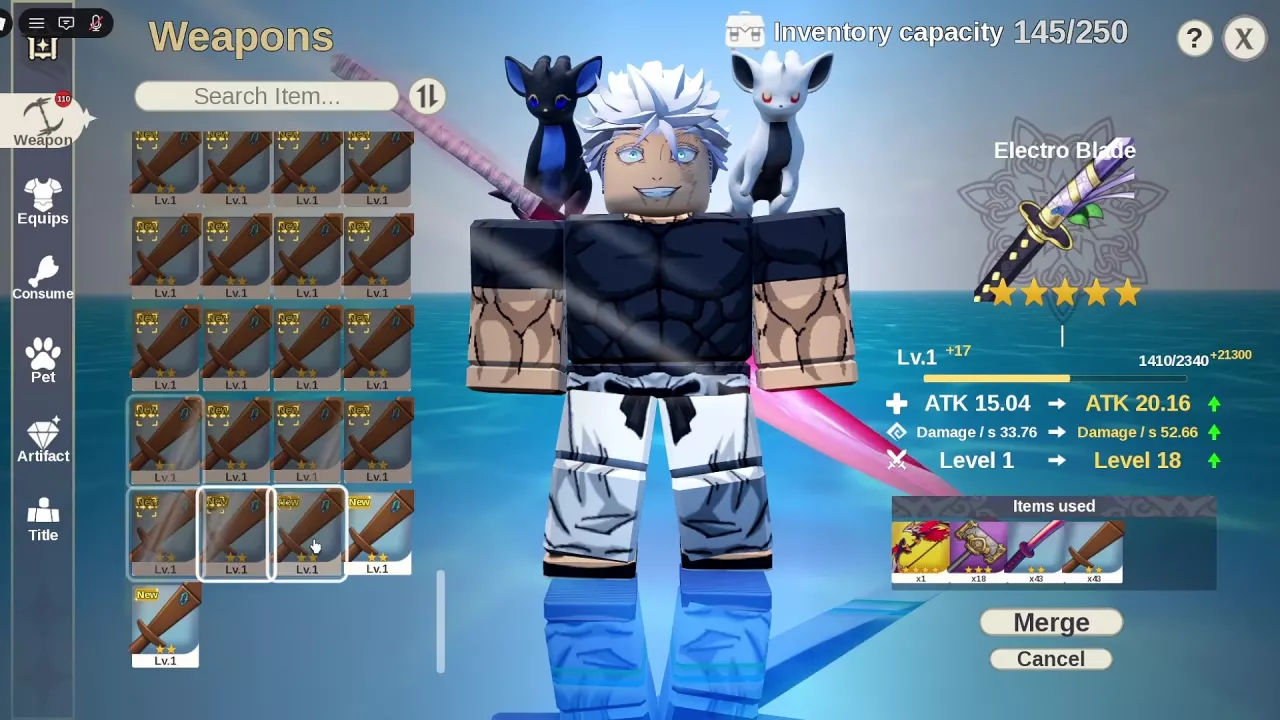
The merge screen places the retained weapon and its level preview on the right, with Items used below them. Use those two areas together to distinguish what gains XP from what gets consumed.
Read Merge XP and Level Previews
Material quantity determines the XP you add, while the target's current progress determines the resulting level. Use the live preview to decide how many weapons to spend toward your next unlock.
Level 1 Hammer and Katana materials
| Material condition | XP per weapon |
|---|---|
| Level 1 Hammer | 400 XP |
| Level 1 Katana | 150 XP |
For these Level 1 materials, total material XP = 400 × Hammers + 150 × Katanas. Count whole weapons. This calculates the XP contribution, not the resulting weapon level; do not apply these per-item values to higher-level materials.
Favian Caster: Level 18 to 22
A Level 18 Favian Caster can reach Level 22 with the following example batch:
- 20 Level 1 Hammers: 8,000 XP.
- 8 Level 1 Katanas: 1,200 XP.
- Total: 28 weapons consumed for 9,200 XP.
In this configuration, the merge panel changes ATK from 17.1 to 18.12 and Damage / s from 46.08 to 48.44. Confirming reaches Level 22. A separate Level 1 Favian Caster remains unchanged: owning two copies does not make both receive the XP.
Electro Blade: Level 1 to 18
For a Level 1 Electro Blade, a selection of 1 Favian Caster, 18 Hammers, 43 Katanas, and 45 Swords provides 21,600 XP and reaches Level 18 after confirmation. In that configuration, the preview changes ATK from 15.04 to 20.16 and Damage / s from 33.76 to 52.66.
These batches are examples of selected materials, not required recipes. Add or remove weapons until your own preview reaches the level you want, and compare before-and-after stats within the same panel.
Enhance at Neko-Chub
Find Neko-Chub in the hub under the Weapons / Enhancement labels.
- Approach Neko-Chub and use E Open.
- Select the weapon you want to enhance. Confirm the target in the right-hand panel. Hovering over another inventory card opens its tooltip without changing the selected upgrade target.
- Adjust the target-level slider. Read the resulting level and ATK alongside the required crystal quantities and Gold.
- Hover over a required material to read its name and source. Blue Crystal drops from Ice Cube; the material sources guide covers material acquisition and other uses.
- Compare your owned quantities with every requirement. 0/1 Blue Crystal means you own zero and need one. Enough Gold alone will not enable that upgrade.
- Once you have the listed materials and Gold, use Upgrade.
Moving the slider only changes the preview; it does not spend resources or raise the weapon's level.
Hammer Enhancement Costs and Max-Level States
| Hammer upgrade selection | Crystal requirement | Gold required | Enhancement-panel ATK preview |
|---|---|---|---|
| Level 1 → 2 | 1 Blue Crystal | 600 Gold | 17.6 → 17.9 |
| Level 1 → 100 | 34 blue crystals, 35 orange-red crystals, and 30 purple crystals | 1,500,000 Gold | 17.6 → 52.3 |
The Level 1 → 100 row is the total cost for that entire selected upgrade, not a per-level price. Use the requirement panel for your chosen weapon and level range rather than multiplying the Level 1 → 2 cost.
Read ATK changes within the enhancement panel. A Level 1 Hammer tooltip can display Attack 18 + 0 while the enhancement panel displays ATK 17.6; keep the panel's before-and-after values together when comparing the upgrade.
At the level cap, the enhancement panel displays MAX and Max Level. A Level 100 One Sword Style is already in this state and cannot receive another level upgrade.